
Google Gemini Adds Multitasking Bubbles to Android
Google's Gemini AI on Android now features a "Minimize" button, collapsing the interface into a resizable bubble for multitasking. This update aims to improve user workflow by allowing continued interaction with the AI while performing other tasks.

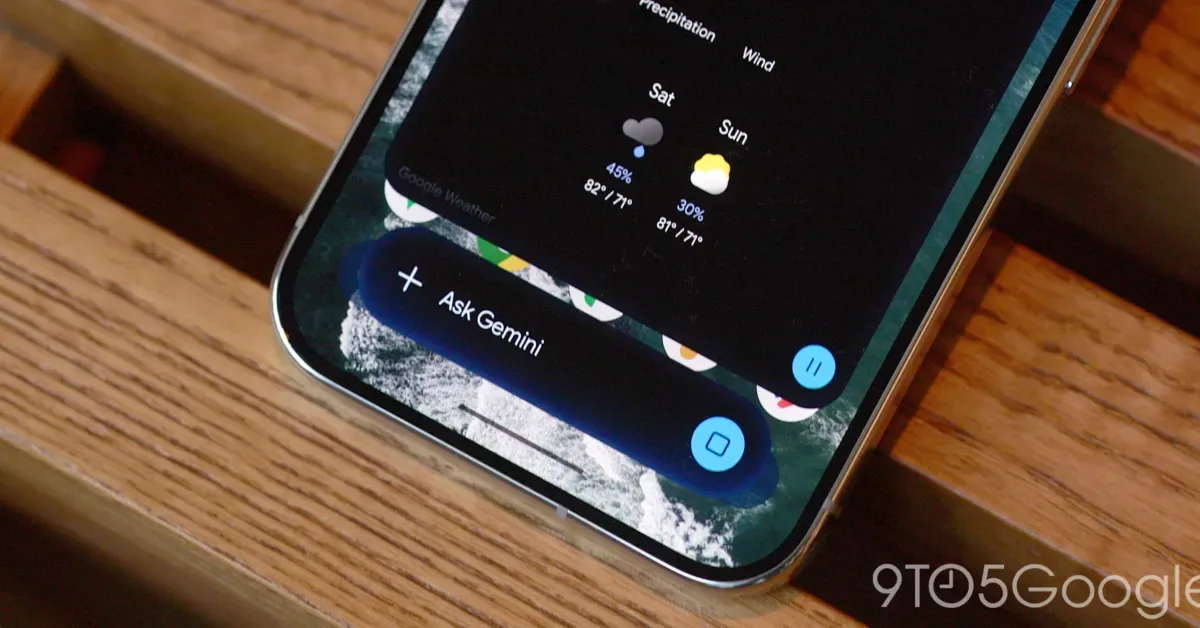
Google's Gemini artificial intelligence assistant on Android has received a significant update, introducing a new multitasking feature that allows users to minimize the chat interface into a floating bubble. The update, rolling out widely starting September 6, 2026, aims to enhance user productivity by enabling seamless transitions between Gemini and other applications.
Previously, interacting with Gemini required users to remain within the app's interface. Now, a "Minimize" button is prominently displayed above the chat container after a prompt is entered. Once tapped, the Gemini overlay collapses into a compact bubble featuring the AI's spark logo. Google has stated, "Gemini is still available while you multitask. Tap to expand. Drag to move or dismiss." This allows users to quickly access Gemini's capabilities while simultaneously engaging with other apps on their device.
The newly introduced Gemini bubble is not entirely free-form, however. It is designed to snap into one of six predetermined positions on the screen, offering a degree of flexibility without complete placement freedom. Reports also indicate a minor bug where the bubble may reset to the bottom-right corner after each minimization, a detail Google is expected to address in future updates.
Streamlining User Interaction
The convenience of the Gemini bubble is particularly noticeable when compared to the previous workflow. Tapping outside the main chat sheet can bring the bubble back into view, providing a quicker return to the conversation than navigating back through the Gemini app and its side panel. Furthermore, the system's back gesture can be used to close the entire overlay, and the bubble itself can be dismissed through dragging.
This functionality provides a faster method for users to return to an ongoing conversation or task. One key use case highlighted is the ability to ask a question and then minimize Gemini to perform another action while waiting for the response, eliminating the need to keep the chat window open. This proactive approach to user experience aims to integrate the AI more fluidly into daily mobile workflows.
For users seeking an even more integrated experience, the update also suggests leveraging Android 17's native Bubble option in conjunction with the Gemini app. This system-level feature could potentially offer enhanced customization and richer interactions for the Gemini bubble, further blurring the lines between dedicated apps and background AI assistance.
The introduction of the Gemini multitasking bubble marks a step forward in Google's strategy to embed its AI capabilities more deeply into the user experience across its product ecosystem. By offering more flexible and less intrusive ways to interact with Gemini, Google is attempting to make the AI assistant a more indispensable tool for productivity and information access on Android devices. The wider rollout signifies Google's commitment to iterative improvements based on user feedback and evolving mobile usage patterns.