
Windows 11 Taskbar and Start Menu Resizing Options Revealed
Microsoft is testing new Windows 11 features for Insiders, allowing users to adjust taskbar position and Start menu size. These changes aim to offer greater customization and improve user experience.

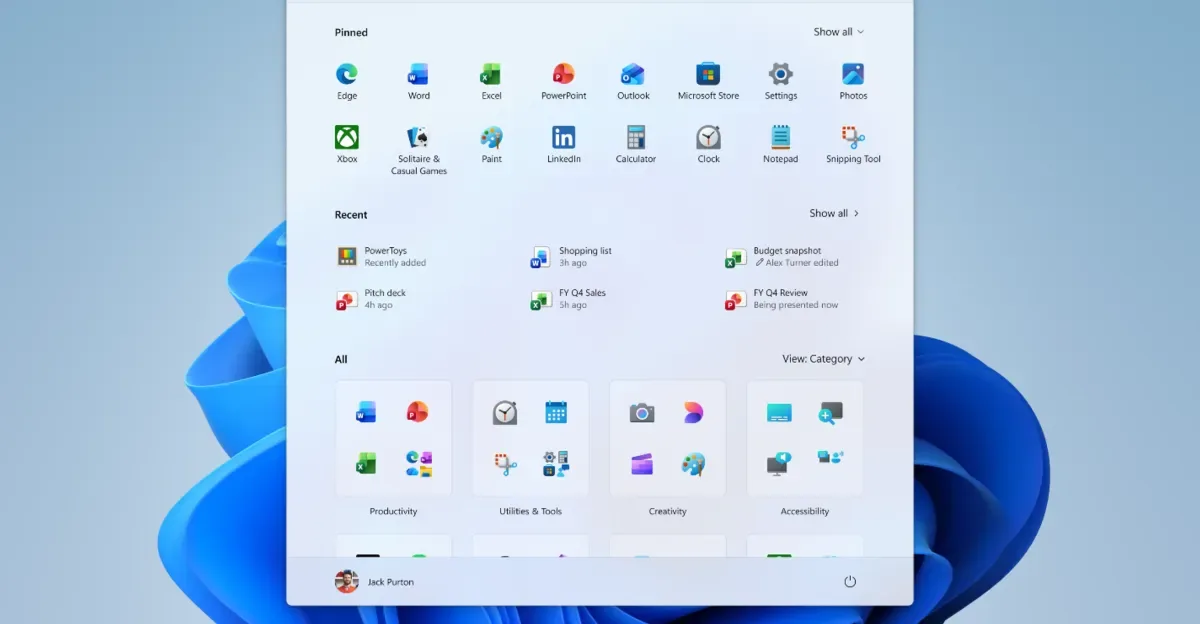
Microsoft is rolling out significant customization options for Windows 11 users, allowing them to reposition the taskbar and resize the Start menu. These new features are currently available to Windows 11 Insiders in the Experimental channel, signaling a move towards greater user control over the operating system's interface. The update allows the taskbar to be placed on any of the four screen edges: bottom, top, left, or right. This flexibility addresses a long-standing request from some users who preferred a different taskbar placement than the default bottom position.
In addition to taskbar repositioning, Microsoft is also enhancing the Start menu's adaptability. Users will be able to choose between a "Small" or "Large" Start menu, offering a more tailored viewing experience. Further granular control is coming to the Start menu's layout, with new toggles designed to let users easily show or hide specific sections. These sections include "Pinned" apps, "Recommended" content, and the "All Apps" list. The company is also rebranding the "Recommended" section to "Recent," a change intended to more accurately reflect its primary function of displaying recently installed applications and frequently accessed files.
Enhanced Customization and User Trust
These updates are part of Microsoft's broader strategy to rebuild user trust by demonstrating steady and visible progress in addressing user feedback. Diego Baca, Microsoft's design director, stated in a blog post, "We have talked about earning trust through steady and visible progress. Start and taskbar are where that trust is tested most, every time you sit down at your PC." The ability to customize these core elements of the Windows experience is seen as a crucial step in achieving that trust.
Further refinements include the option to hide personal information from the Start menu, such as your name and profile picture. This privacy-focused feature is particularly useful for users who frequently share their screens for presentations or collaboration, allowing them to maintain a cleaner and more professional interface. Insiders can also access a potentially shorter taskbar option, which could be particularly beneficial for users with smaller display sizes or those looking to maximize screen real estate. The integration of these features into the Windows 11 ecosystem is a deliberate effort to cater to a diverse range of user needs and preferences.
The changes to the Start menu and taskbar reflect a growing trend in operating system design towards personalization and user empowerment. As devices become more integrated into our daily lives, the demand for interfaces that adapt to individual workflows and preferences intensifies. Microsoft's willingness to experiment with these core components, even within its Insider program, suggests a commitment to evolving Windows based on real-world usage patterns. The feedback gathered from the Experimental channel will be instrumental in shaping the final release of these features to the broader Windows 11 user base in the coming weeks.