
Windows 11 Taskbar Returns to Top: New Options Arrive
Microsoft is bringing back taskbar customization to Windows 11, allowing users to move it to the top, left, or right edges of the screen. The update also includes options to disable Bing search results and reduce OneDrive prompts.

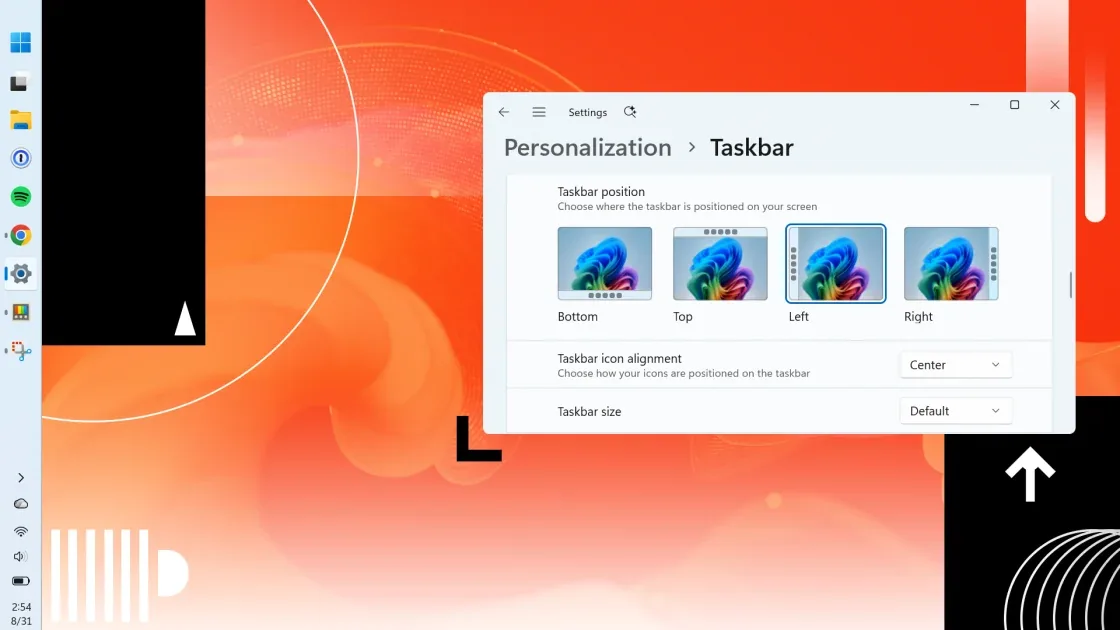
Microsoft is reversing a contentious decision by bringing back the ability to reposition the Windows 11 taskbar. Starting September 8, an update will allow users to move the taskbar to the top, left, or right edges of their screens, addressing a long-standing complaint from PC users. This change comes as part of a broader update that also introduces new customization options for the Start menu and a less intrusive OneDrive experience.
The forthcoming Windows 11 update, which is currently available in a preview build, will enable users to move the taskbar beyond its default bottom position. Previously, this option was removed with the launch of Windows 11, sparking criticism from many who preferred the flexibility of earlier Windows versions. "Most Windows users will likely never move their taskbars, but Microsoft wants you to know you now have that freedom," stated a Microsoft representative during a recent industry event, highlighting the company's renewed focus on user feedback this year.
Beyond taskbar placement, the update also offers enhanced control over the Start menu and search functionality. Users will gain toggles to hide the "All Apps," "Pinned," and "Recommended" sections within the Start menu. Crucially, an option to disable Bing search results and Microsoft Store results will allow users to confine searches strictly to local files, addressing another significant point of user frustration.
Enhanced User Control and OneDrive Adjustments
These granular search options are located within the Settings app under Privacy & Security > Search. The ability to restrict searches to local files is particularly welcome, as many users have expressed dissatisfaction with the integration of web search results within their operating system. Microsoft's strategic integration of its services, like Bing and OneDrive, has been a point of contention, with users often feeling overwhelmed by promotional prompts.
Microsoft is also making strides to make its cloud storage service, OneDrive, less of an annoyance. A new "Opt out of backup" option will be available, allowing users to decline OneDrive's file backup offers indefinitely. Previously, users were often presented with temporary reminders like "Remind me in 3 days," which could lead to persistent pop-ups. This adjustment comes after a recent incident where a OneDrive Photos app was mistakenly distributed to many Windows PCs, though Microsoft attributed it to an error.
In addition to these core operating system changes, the latest PowerToys update, version 0.101, introduces a utility called Window Hopper. This new tool brings a macOS-style keyboard shortcut, Alt+`, to Windows, enabling users to quickly switch between windows of the same application. This provides a more focused alternative to the standard Alt+Tab shortcut, which cycles through all open windows across all applications, often leading to a cluttered experience when many applications are running simultaneously.
The gradual rollout of these features means that not all users will see them immediately. Microsoft's patch notes indicate that the new taskbar and Start menu options will be activated on PCs over the coming weeks and months, in a process that may appear somewhat random. However, the company's commitment to incorporating user feedback, as demonstrated by these significant updates, signals a shift towards a more responsive development cycle for Windows 11.