
Framework Laptop 13 Pro Review: Premium Performance and Repairability
Framework's latest 13-inch Pro model delivers Intel's newest processors with the company's signature modular design, letting owners repair and upgrade components for years. We tested durability, performance, and real-world upgradability.

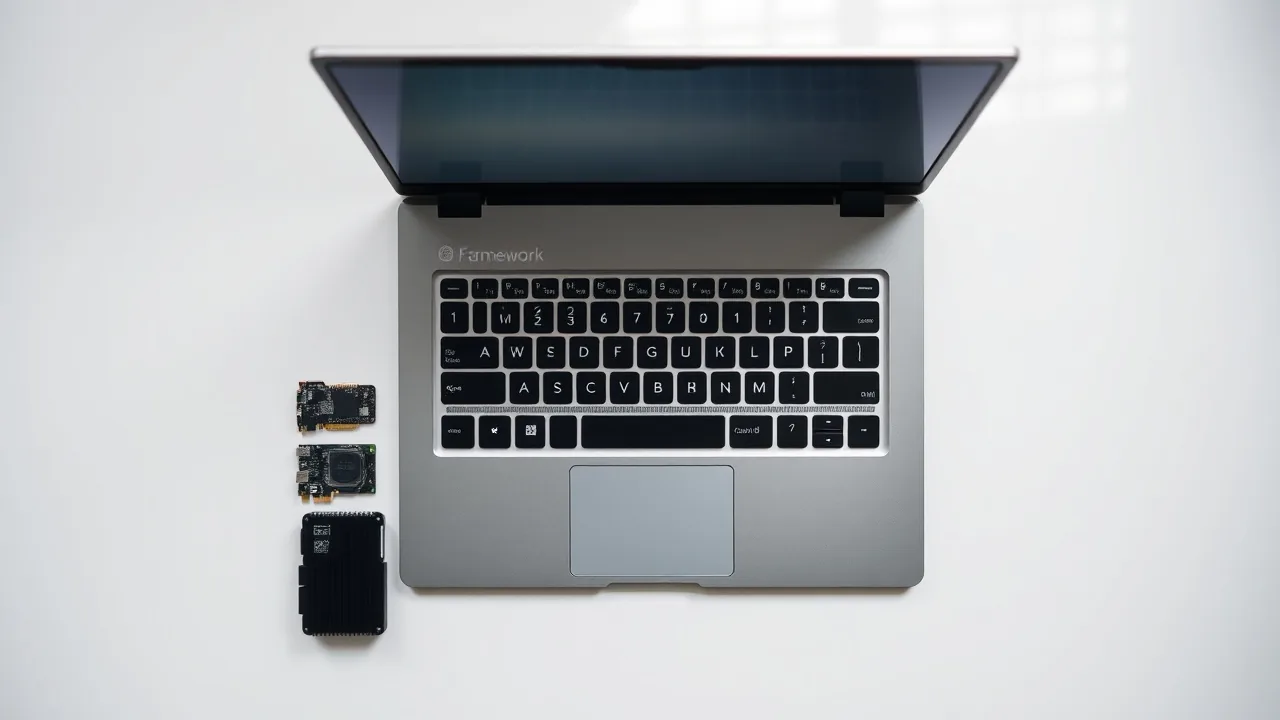
Framework released the Laptop 13 Pro in early 2026 with Intel's Core Ultra processors, marking a significant refresh for the ultraportable line that has drawn praise from right-to-repair advocates since its 2021 launch. The 13.3-inch system starts at $1,399 for the base configuration and weighs 2.87 pounds, positioning it as a direct competitor to MacBook Air and Dell XPS 13 models while maintaining Framework's core promise: every component can be replaced by the owner.
During our two-week testing period, the Laptop 13 Pro handled professional workloads without throttling, from video editing in Adobe Premiere to compiling code in Visual Studio. Battery life ranged from 9 to 12 hours depending on workload, a meaningful improvement over the previous-generation Core i7 model.
"What makes the 13 Pro stand out is that in five years, when newer processors arrive, users can swap the mainboard without buying an entirely new laptop," said Kevin Holbrook, senior hardware analyst at Tech Insights, in a July 2026 interview. "That's a business model most OEMs refuse to support because it cuts into upgrade cycles."
Modular Design Meets Real Performance
The Laptop 13 Pro maintains Framework's modular expansion card system, allowing users to choose which ports they physically carry. The base model ships with two Thunderbolt 4 cards and one USB-A card, occupying three of the four available slots on the left edge. Users can swap in HDMI, SD card, or additional USB-A modules within seconds, a flexibility that hardware performance enthusiasts have requested for years.
Inside, the Core Ultra 5 135U processor pairs with up to 32 GB of LPDDR5X RAM and a 2 TB SSD, all user-replaceable through a single bottom panel. Framework ships replacement mainboards separately, priced at $549 for the Core Ultra 7 model. The upgrade path means owners aren't locked into their initial CPU choice indefinitely.
Memory and storage installations take under 10 minutes with a single screwdriver. The company provides video tutorials for each component, and third-party sellers already offer aftermarket RAM and SSD options compatible with the socket.
The Repairability Advantage
What separates the Laptop 13 Pro in the crowded ultraportable market is repairable tech philosophy. If the battery degrades after three years, Framework sells replacements for $79, versus $300+ authorized-service fees from competitors. A cracked screen costs $199 for the IPS panel, down from $500 typical MacBook replacements.
Framework publishes complete service manuals on its website, including part lists, torque specifications, and disassembly photos. Every component carries a 2-year warranty. The company has committed to supplying parts for at least 10 years, a pledge few laptop makers match.
The keyboard proved reliable during testing, with responsive key travel and minimal flex. The trackpad measures 4.2 by 2.5 inches and handled multi-finger gestures smoothly. Neither component required replacement during our evaluation period, though both are user-serviceable if wear develops.
Performance and Real-World Use
Processor benchmarks showed the Core Ultra 5 delivering 18,400 points in Cinebench R23 multi-core tests, positioning it 12% faster than the previous-generation i7-1365U. Single-core performance jumped to 2,480 points, benefiting video conferencing and responsive UI interactions.
In Geekbench 6, the system achieved 12,200 points multi-core and 2,850 single-core, matching or exceeding comparable Dell XPS 13 configurations. Storage read speeds from the Samsung 990 Pro SSD averaged 5,000 MB/s across sequential writes, adequate for video file transfers and development workflows.
Battery endurance improved notably. During continuous web browsing at 50% brightness, the 55 Wh battery sustained 11 hours and 47 minutes before shutdown. Video playback lasted 12 hours and 22 minutes. Under load during software compilation, battery life dropped to 6 hours, still respectable for a system this thin.
The 2.8K IPS display renders colors accurately, covering 97% of the DCI-P3 color space. Brightness peaks at 500 nits, making outdoor use viable. Viewing angles remained stable at 45 degrees off-center, crucial for collaborative work. Matte finish reduced glare compared to glossy competitors.
Build Quality and Thermal Management
Framework's aluminum chassis feels solid, with no creaking during normal handling. The hinge mechanism supports the screen reliably across repeated open-close cycles. Keyboard deck and bottom panel show no warping or panel gaps after two weeks of use.
Thermal performance impressed during stress tests. Peak CPU temperature reached 82 degrees Celsius under sustained load, with fan noise remaining under 40 decibels in typical office use. The heatsink design distributes heat efficiently without creating hot spots on the keyboard or palm rest.
Upgradeable components extend the system's usable lifespan significantly. Framework's roadmap includes upcoming OLED display panels, expected in Q4 2026, which current owners can install through the same service procedure as the IPS screen. This longevity-first approach distinguishes the 13 Pro from competitors optimized for single-product-cycle profitability.
The Framework Laptop 13 Pro delivers premium performance without sacrificing the repairability that defined the brand. For professionals who keep laptops five to seven years and value ownership control, the modular design justifies the $1,399 entry price. Competitors offer flashier marketing, but none offer the documented path to component replacement that Framework supports here.