
Free Mac App Reveals USB-C Cable Performance
A new free macOS application called WhatCable analyzes your USB-C cables and devices by reading data already collected by your Apple Silicon Mac. It helps identify performance bottlenecks and verify cable capabilities.

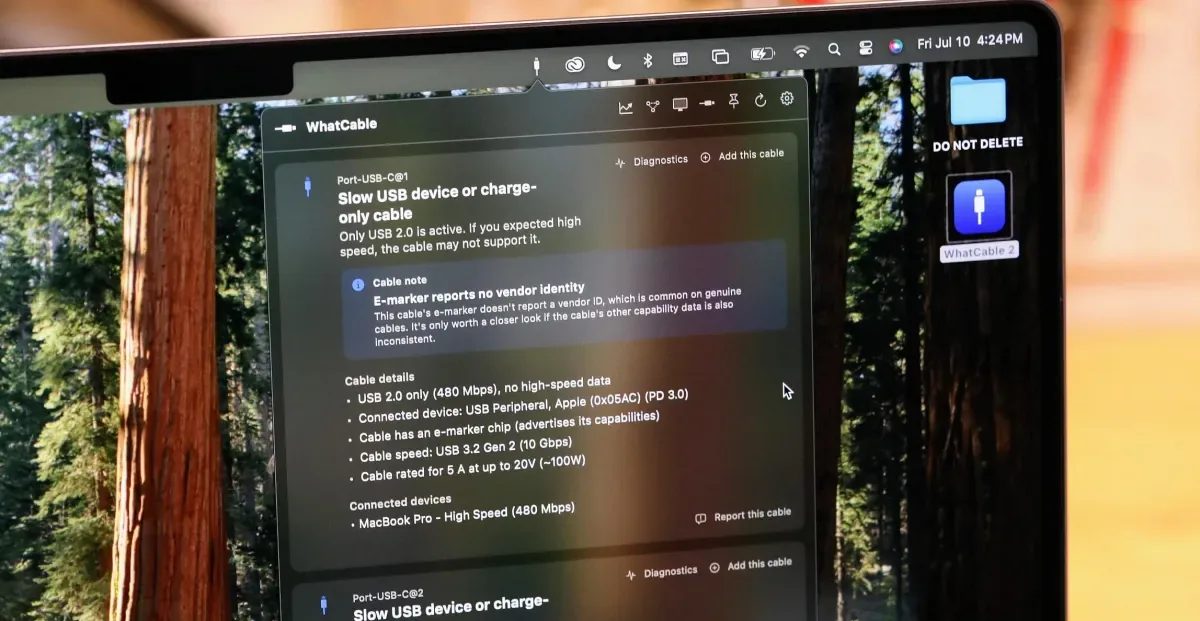
A new, free application for Macs equipped with Apple Silicon chips is providing users with unprecedented insight into the performance of their USB-C cables and connected devices. Dubbed WhatCable, the software leverages data already processed by the Mac's internal port controller to reveal critical information about connection speeds, power delivery, and data transfer capabilities that are typically hidden from standard macOS tools.
Developed by Darryl Morley, WhatCable operates by accessing the IOKit registry, where macOS stores information gathered during USB Power Delivery negotiations. When a USB-C cable with an "e-marker" chip is connected, the Mac's port controller queries this chip for details such as vendor ID, speed rating, current rating, voltage limits, and whether the cable is active or passive. WhatCable then retrieves and displays this data through a simple menu bar widget.
"Every Apple Silicon Mac has a port controller chip that handles USB Power Delivery negotiation," Morley explained. "When you plug in a cable with an e-marker, the port controller sends a 'Discover Identity' message to the chip in the cable and gets back a structured message. macOS writes that response into the IOKit registry. WhatCable reads it using Apple’s public APIs." He emphasized that the tool requires no special access, as the information is publicly available within the operating system.
Beyond e-marker data, WhatCable also reports on the Mac's own hardware performance, including the actual negotiated connection speed, Thunderbolt link speed, and live voltage and current readings for each port. By correlating this information with the connected device's specifications and the cable's reported capabilities, the app can pinpoint bottlenecks when a connection isn't performing as expected.
Identifying Cable Deception and Wear
The utility of WhatCable was demonstrated through several real-world tests. For instance, a Satechi cable, while reporting a capability for 100W charging, was identified by the app as only supporting 480Mbps USB 2.0 data speeds. While this limitation is noted, the cable's charging capacity was confirmed as sufficient for the MacBook Pro. In contrast, a Supercalla cable, advertised as 10Gbps and 100W, showed a discrepancy: the cable's e-marker claimed high performance, but the Mac's connection speed was limited, indicating the cable might be wearing out.
Further testing revealed similar issues with other cables. A USB4 40Gbps cable, for example, was connected by the Mac at only 10Gbps, as confirmed by a rapid 25GB file transfer completing in seconds. Another cable, marketed for 100W charging and claiming 10Gbps USB 3 data speeds via its e-marker, failed to deliver, with file transfers taking minutes rather than seconds. This highlights how cable specifications, whether exaggerated or outdated, can be exposed by WhatCable.
Even older cables can be assessed. A LaCie cable from 2019, marked as 10Gbps, was reported by WhatCable as a 20Gbps Thunderbolt cable, prompting further investigation into its actual capabilities with Thunderbolt-specific devices.
WhatCable isn't the first application to offer USB-C diagnostics on macOS. A paid alternative, USB Connection Information, has been available for about a year. However, WhatCable distinguishes itself by being free at its core, with a paid Pro version offering advanced features like real-time power monitoring and diagnostics. Morley has also developed a simpler app, WhatPort, focused solely on monitoring individual port activity. He stated that a Windows version is unlikely due to hardware and API inconsistencies, and similar limitations exist for Android and iOS. However, he is actively developing a Linux port and continues to update the Mac application, with progress tracked on his GitHub page.