
Customize Your MacBook Neo: A Colorful DIY Repair Adventure
Apple's MacBook Neo now allows users to buy official replacement parts in various colors for self-service repair. One user documented their attempt to create a unique, multi-colored laptop.

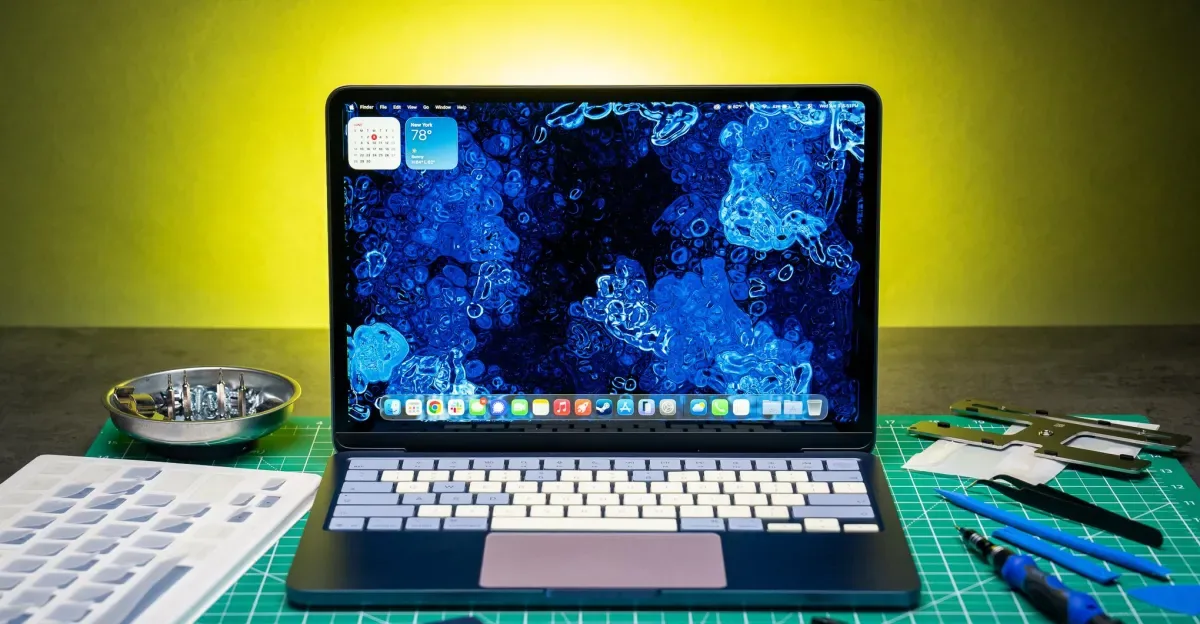
Apple is offering users a new way to personalize their devices with the MacBook Neo, its most affordable and colorful laptop to date, which also boasts enhanced repairability. Owners can now purchase replacement parts in any of the Neo's four distinct colors and install them themselves, opening the door for creative customization. This led one user to explore the possibilities of crafting a uniquely vibrant machine using genuine Apple components.
The experiment involved purchasing an indigo MacBook Neo and ordering a selection of spare parts—a trackpad and bottom case in blush, and USB-C ports and keycaps in citrus. The objective was to achieve a striking, mismatched aesthetic without undertaking complex repairs like disassembling the display. The total cost for these four components reached $165.64 before tax, a significant amount representing nearly 30 percent of the laptop's original price. While the customization proved enjoyable, the expense highlights that such modifications are primarily for personalization rather than cost savings.
The process of opening the MacBook Neo proved straightforward, with resources like iFixit providing detailed guides. Replacing the bottom case was the simplest step, as it required initial access with a pentalobe screwdriver. Swapping out the trackpad and USB-C ports also proved relatively easy, involving the disconnection of ribbon cables and the removal of Torx screws. After approximately 40 minutes, the user had successfully installed the new colored parts, transforming the laptop's appearance.
Diving Deeper into Keycap Customization
The most anticipated part of the customization was replacing the keycaps, a task driven by a passion for mechanical keyboards and colorful keycaps. The aim was to emulate the two-tone style popular in mechanical keyboards by changing the alphanumeric keys, space bar, and arrow keys to citrus, while keeping the modifier keys in the original indigo. While changing laptop keys is inherently more challenging than on a mechanical keyboard, initial confidence was high.
However, the keycap replacement presented unexpected difficulties. The user had not ordered the specialized tools for keycap removal, overlooking that Apple's self-service repair store, managed by a third-party logistics company, requires users to scroll down for tool options. These tools, while not strictly essential, would have likely made the process less risky than using a spudger. Crucially, instructions for reattaching the keys were found to be buried on a secondary page linked at the bottom of Apple's main repair instructions. This oversight led to minor damage to fragile hinge clips on several keys and the shearing of a metal fin on an arrow key's scissor switch before the correct technique was understood.
Despite these initial setbacks, the user eventually mastered the proper method for reattaching keycaps, aided by video tutorials. The citrus keycaps were successfully installed on most alpha and number keys. However, due to the prior damage, some original indigo keys had to be retained on specific alphanumeric keys, and others were kept indigo intentionally for aesthetic reasons. The repair of the arrow key's scissor switch was deemed complex enough to potentially require a visit to an Apple Store Genius Bar, prompting a thought about the reaction to the resulting multicolored MacBook Neo.
The experience underscored that these modifications are achievable with careful attention to instructions and patience. While replacing all the chosen parts may not be economically sensible—especially spending $80 to replace a functional trackpad—swapping just the keycaps for around $39 (plus approximately $13 for the toolkit) offers a noticeable aesthetic upgrade. The user strongly advised learning from their mistakes and prioritizing instruction reading.
Even with the imperfect execution of some changes, the possibility of such extensive customization on a MacBook is celebrated. Despite the frustrations with Apple's unintuitive parts website and buried instructions, the user expressed hope that this trend toward greater repairability will continue with future MacBook Air and Pro models. The desire for more color options and the freedom to mix and match parts, even with the inherent risks, remains a strong one for enthusiasts and everyday users alike.