
iOS 27 Messages App Gets Smarter with AI, Drawing, and Suggestions
Apple's iOS 27 overhauls the Messages app with enhanced Siri integration, a new drawing tool, and contextual suggestions that streamline communication and task management.

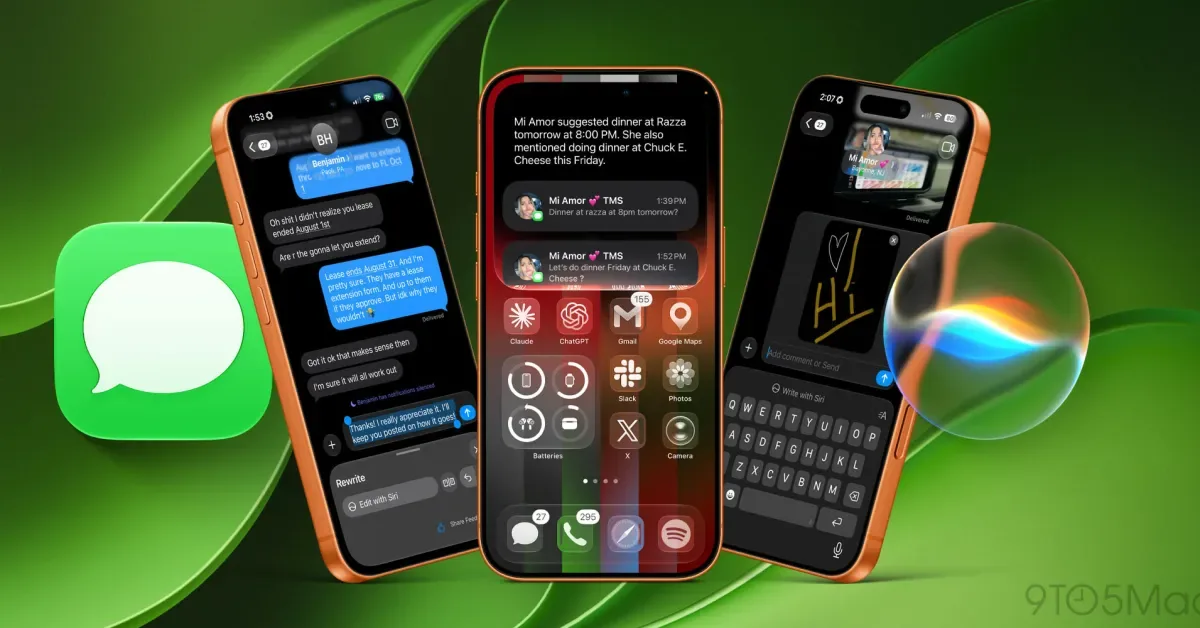
Apple's latest mobile operating system, iOS 27, introduces a suite of significant upgrades to its Messages application, enhancing functionality and user experience through artificial intelligence and new creative tools. While the visual interface may appear familiar, the underlying architecture has been fundamentally re-engineered to make messaging faster, more intuitive, and less prone to accidental actions.
Among the most lauded improvements is the complete customization of the voice input button. Previously, users often accidentally triggered voice messages while intending to type, or found the button's function (dictation vs. voice memo) ambiguous. iOS 27 now empowers users to reconfigure this button to function as a dedicated dictation tool, a voice memo recorder, or to be removed entirely. This seemingly small adjustment, accessible through Settings > Messages > Show in Text Fields, significantly enhances usability.
A new creative addition to Messages is the Drawing app, accessible via the '+' button next to the text field. This feature brings the familiar markup tools found in the Notes app directly into the messaging interface. Users can sketch using various pens, markers, and highlighters, select from a wide color palette, and even utilize gestures to create perfect shapes or paste images. The integration is particularly seamless on iPads, where it fully supports the Apple Pencil for a more fluid drawing experience.
AI-Powered Contextual Suggestions Transform Communication
Beyond quality-of-life enhancements, iOS 27 introduces powerful AI-driven features, notably 'Contextual Suggestions'. This system intelligently analyzes conversation content to proactively offer relevant actions or information, drastically reducing manual steps. For instance, if a conversation involves a request for photos from a specific trip, Messages will surface matching images from the user's library. Similarly, event invitations can be instantly added to the calendar with a single tap, and grocery list items mentioned in a chat can be directly added to the Reminders app.
This proactive assistance is a core component of the new SiriAI integration within Messages. Apple's virtual assistant now leverages a deeper understanding of conversational context to perform complex tasks. A user might ask Siri to find and send specific photos from a past trip to a group chat, retrieve details like date and time from an image of an invitation, or transfer a shared web link to a different conversation. These capabilities aim to make interactions more frictionless and efficient, fulfilling the long-held promise of a truly intelligent messaging assistant.
The impact of these AI enhancements is substantial. By automating routine tasks and surfacing relevant information precisely when needed, iOS 27's Messages app aims to streamline workflows for millions of users. The system's ability to process natural language prompts and execute multi-step actions signifies a significant leap forward for mobile AI assistants.
In addition to these headline features, iOS 27 brings other notable upgrades to Messages, including improved RCS messaging interoperability, faster cross-device syncing, enhanced Genmoji creation, automatic message retries for unreliable connections, and overall performance improvements. These collective updates reinforce Apple's ecosystem by integrating sophisticated AI capabilities more deeply into everyday communication tools.