
Apple's Assistive Access Creates Ideal Kids' First Smartphone
A hidden iOS feature called Assistive Access can transform an iPhone into a simplified, secure device for children, blocking internet browsing and unnecessary apps.

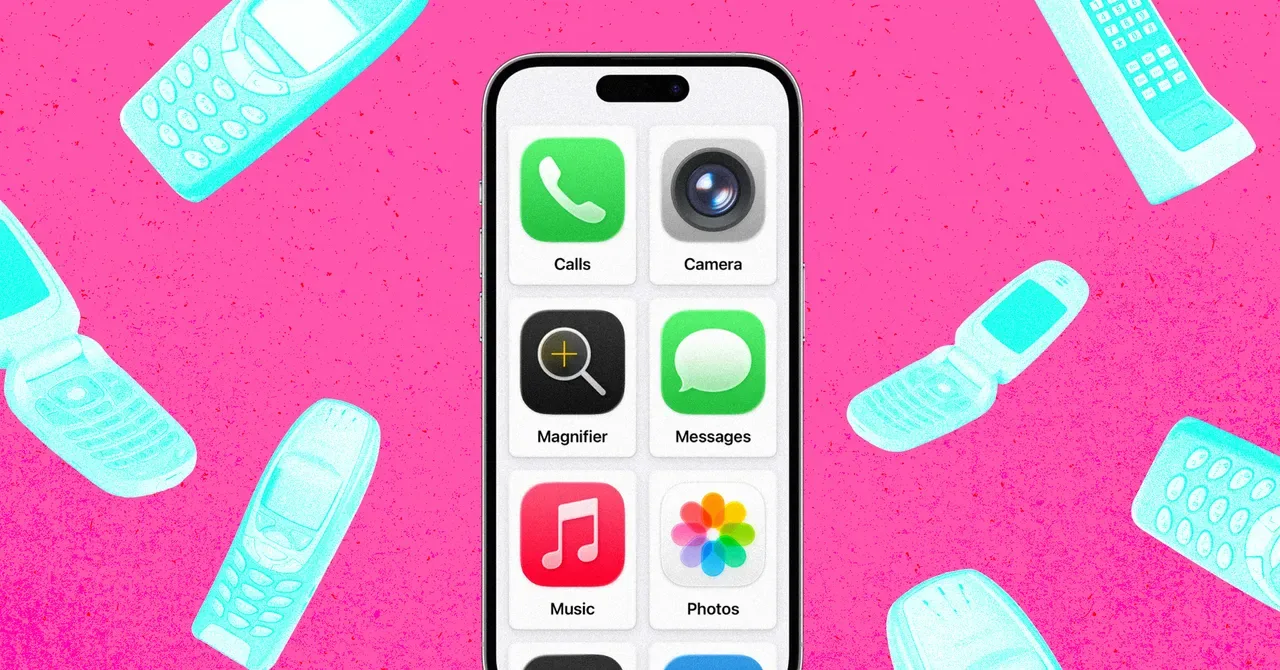
A little-known feature within Apple's iOS operating system, Assistive Access, is emerging as an effective solution for parents seeking to equip their children with a first smartphone that is both functional and highly controlled. Introduced with iOS 17, the tool, primarily designed for individuals with cognitive disabilities, offers a simplified interface that can be configured to allow only essential applications, crucially blocking unrestricted internet access.
The challenge for parents is to provide a device that offers connectivity and safety features, such as location tracking and communication, without exposing young users to the potential dangers of the open internet and social media. Traditional "dumb phones" lack the navigation and emergency capabilities of smartphones, while standard iPhone parental controls have proven to have workarounds, such as links sent via messages bypassing restrictions. Third-party apps designed to limit smartphone functionality often come with subscription fees, prompting a search for a native solution.
Simplifying the Smartphone Experience
Assistive Access presents a compelling alternative by significantly reducing the complexity of the iPhone interface. Instead of standard app icons, it uses large, tile-like buttons that can be customized to display only the applications selected by the user. This setup is managed through the iPhone's Accessibility settings. Parents can select which apps, such as Calls, Messages, Maps, or Camera, are permitted. Crucially, by simply not including web browsers like Safari or Chrome in the allowed apps, internet access is effectively disabled within this mode. Links received through messaging apps are treated as plain text, preventing accidental navigation away from the approved functions.
This feature allows for granular control over communication. When an app like Messages or Calls is enabled, users can specify whether contact is allowed with everyone, only saved contacts, or a select list of favorites. Further customization extends to appearance and functionality, including options to display the time on the lock screen, disable the mute switch, and control how notifications are presented. Even media apps like Music can be restricted to pre-approved playlists.
To activate and deactivate Assistive Access, a unique four-digit passcode is set. This ensures that only authorized individuals can switch the device between the simplified mode and the standard iOS interface. The author's chosen configuration for their son's phone includes only Calls, Messages, Maps, Camera, Photos, and Music – effectively turning an older iPhone into a secure, six-app "dumb phone" without any additional cost.
Apple representatives have acknowledged the potential of Assistive Access for this purpose, with one Apple Store staff member reportedly remarking that it was a superior solution to standard Screen Time controls. This suggests that Apple itself recognizes its utility beyond its original intended audience, although the company does not extensively market it for child-proofing smartphones. The upcoming iOS 27 update is set to introduce enhancements to Screen Time that will mirror some of Assistive Access's capabilities, including the ability to remove Safari access for child profiles, indicating a potential shift in Apple's approach to parental controls.
Despite its advantages, Assistive Access does have minor drawbacks. The interface can sometimes feel sluggish, and it does not integrate with existing Screen Time limits. Additionally, iPhones in Assistive Access mode cannot be turned off without reverting to the standard iOS interface. One reported issue involved the Messages app freezing under certain conditions, requiring a reversion to normal iOS to unfreeze. However, for parents seeking a robust, cost-effective, and secure way to introduce their children to mobile technology, Apple's Assistive Access offers a powerful, built-in solution.